
Evergreen Webinar Funnel Setup (where Deadline Funnel fits naturally)
Most evergreen funnels rely on urgency, but most urgency is not real.
If your countdown resets when someone refreshes the page, people learn quickly that the deadline does not matter. When that happens, they delay, leave, and come back later because there is no real consequence to waiting.
If you want urgency to work, your deadline needs to hold.
This guide explains how to create real deadlines in an evergreen funnel, why they increase conversions, and where a tool like Deadline Funnel fits into the setup.
What Is a Real Deadline in an Evergreen Funnel?
A real deadline means the timer is tied to the person, not just the page.
A real deadline does three things:
- Assigns a unique deadline to the individual
- Prevents the timer from resetting
- Enforces the same deadline across pages and emails
Most countdown timers do not do this. They simply display time on a page. If someone refreshes and gets a fresh timer, the urgency is gone.
Tools like Deadline Funnel track the user and enforce the same timeline across your funnel.
If you want a full breakdown of how it works, pricing, and real user feedback, read: Deadline Funnel Review: How It Works, Pricing, Real User Experiences, and What to Know Before You Use It
Where Deadlines Fit in an Evergreen Funnel
A deadline is not the funnel itself. It is the timing layer inside the funnel.
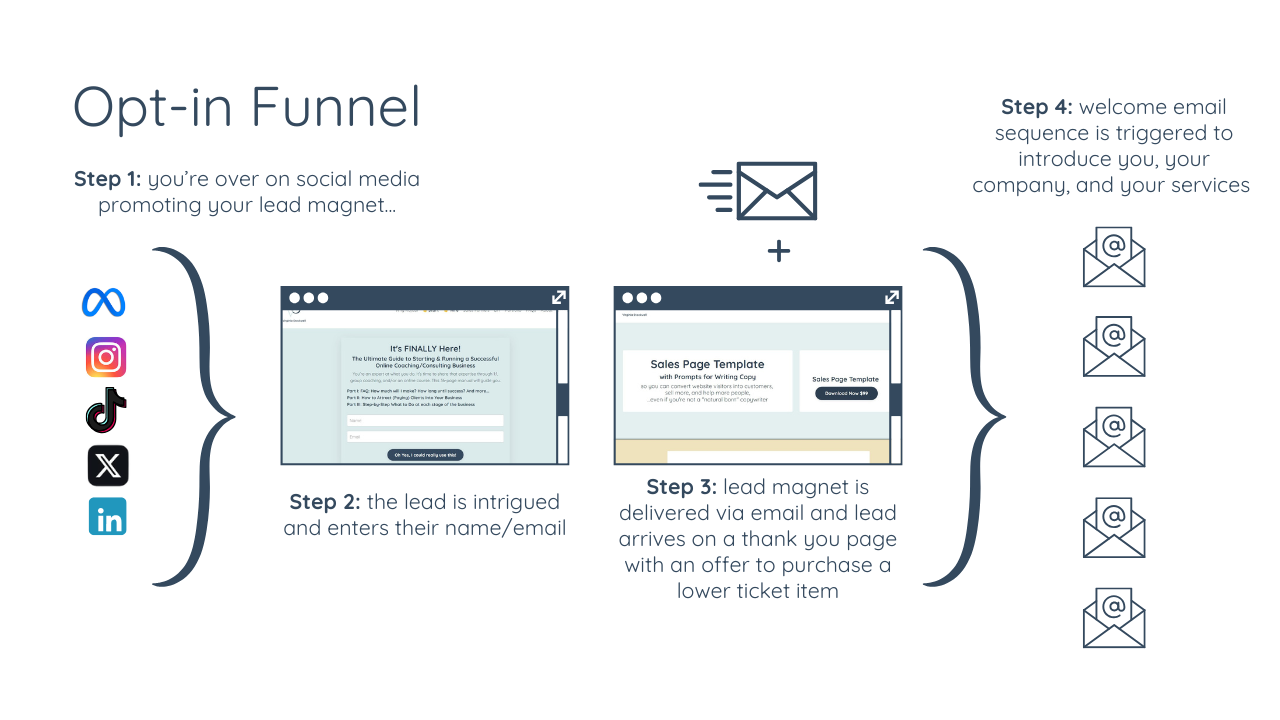
A typical evergreen funnel looks like this:
- Someone opts in
- They receive an email sequence
- They visit the sales page
- The offer expires after a set amount of time
The deadline controls how long that person has to make a decision before the offer changes or closes.
Step 1: Decide When the Deadline Starts
The first step is choosing the trigger that starts the countdown.
Common trigger points include:
- When someone opts in
- When someone clicks a link in an email
- When someone lands on a sales page
The best option depends on how your funnel works.
If your funnel is driven mostly by email, starting the deadline when someone clicks a link often makes more sense than starting it at the opt-in stage. It creates better alignment between the message and the time window.
Step 2: Set the Length of the Deadline Window
Most evergreen funnels use a deadline window of three to seven days.
That window should match the type of offer you are selling.
In general:
- Lower-priced offers can usually close faster
- Higher-priced offers usually need more time
- More complex buying decisions often need a longer window
Do not choose the deadline length randomly. The countdown should reflect the actual amount of time someone needs to decide.
Step 3: Define What Happens When the Deadline Expires
This is the part many people skip.
If nothing changes when the timer ends, the deadline has no meaning.
When the deadline expires, something specific needs to happen. For example:
- The sales page redirects to another page
- The offer is removed
- The price changes
- The page shows that the promotion has ended
The outcome should match what you promised before the deadline. If you say the offer ends, it needs to end.
Step 4: Keep the Deadline Consistent Across Pages and Emails
A deadline only works if the same person sees the same countdown everywhere.
That means:
- Your emails need to reflect the same deadline
- Your sales pages need to reflect the same deadline
- The deadline cannot restart on another device or page refresh
This is where most basic timers fall apart.
If your email says there are two hours left, but the sales page shows a new countdown, trust drops immediately.
Tools like Deadline Funnel are designed to solve this problem by tracking the user and enforcing the same timeline across the funnel.
If you are comparing tools or deciding whether this is worth using, see the full review here:
Deadline Funnel Review: How It Works, Pricing, and User Experience
Step 5: Test the Full User Experience
Do not assume the setup works just because the timer appears on the page.
Go through the full funnel like a user and test every stage.
Check things like:
- Does the timer begin at the correct moment?
- Does it stay consistent across emails and pages?
- Does the timer expire when it should?
- Does the page redirect or change correctly after expiration?
- Can the timer be reset by refreshing or returning later?
A deadline strategy only works if the technical setup is solid.
Why Real Deadlines Increase Conversions
People are more likely to act when they know the deadline is real.
If they believe they can come back anytime, they usually postpone the decision.
When the deadline holds, the buying decision changes. They either take action now or they lose access to the offer.
That is why real deadlines can increase conversions.
But urgency only works when the offer itself is already strong. A deadline will not fix weak messaging, a confusing sales page, or an offer people do not want.
When You Should Not Use Deadlines
Deadlines are not right for every funnel.
You should not add them if:
- Your offer is still unclear
- Your messaging is weak
- Your funnel is not converting at all
- You are using fake urgency with no real expiration
A deadline is not the foundation of a good funnel. It is a conversion tool that works best after the offer and messaging are already working.
How Deadline Funnel Fits Into This Strategy
Deadline Funnel is built to enforce real deadlines in evergreen and fixed-date funnels.
It does not replace your funnel builder, course platform, or email platform. Instead, it adds the timing layer that keeps the deadline consistent and enforceable.
That matters because basic countdown timers often reset, which trains people not to take the deadline seriously.
If you want the full breakdown of how the software works, pricing, user feedback, and what to know before using it, link this post to your review article:
Deadline Funnel Review: How It Works, Pricing, Real User Experiences, and What to Know Before You Use It
Frequently Asked Questions
What is an evergreen deadline?
An evergreen deadline is a time limit assigned to each individual based on when they enter the funnel.
Do countdown timers increase conversions?
They can, but only if the deadline is real. A timer that resets does not create real urgency.
How long should an evergreen deadline be?
Most evergreen funnels use a three to seven day window, depending on the price and complexity of the offer.
Can you create real deadlines without software?
It is difficult to do reliably. Most manual setups break across pages, emails, or devices.
Does Deadline Funnel build your funnel for you?
No. It does not build your funnel. It controls the deadline timing inside a funnel you already have.
Conclusion
If you want urgency to increase conversions, the countdown cannot be fake.
A real deadline needs to start at the right moment, stay consistent across the funnel, and lead to a real change when it expires.
That is what makes the timing believable.
And that is what gives people a reason to act now instead of later.
Related Reading:

